

n8n Extract text from PDF and image using Vertex AI (Gemini) into CSV
2 Items
Description
Youtube: https://www.youtube.com/watch?v=cDqrtSO_rHU&t
Case Study
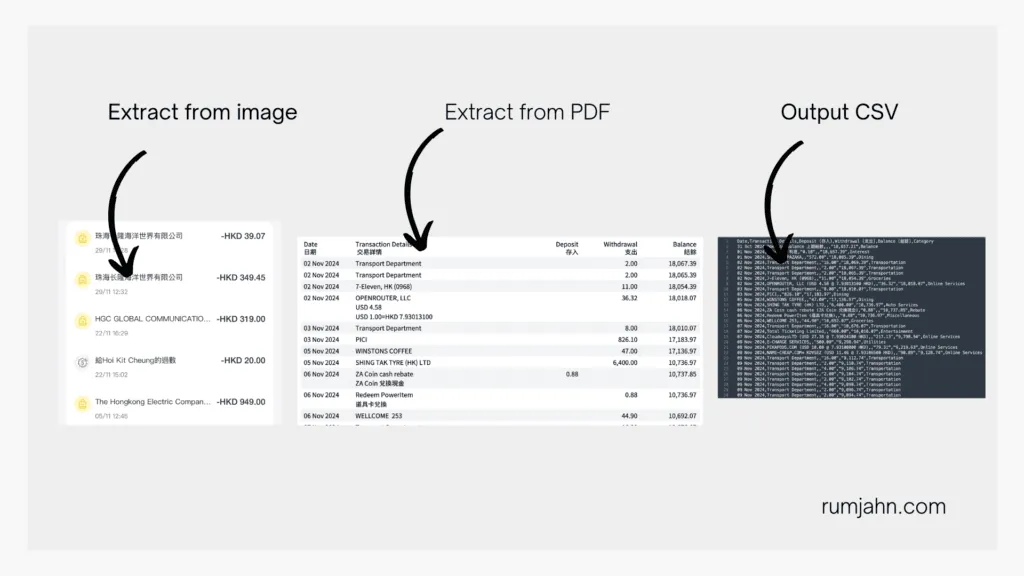
I'm too lazy to record every transaction for my expense tracking. Since all my expenses are digital, I just extract the transactions from bank PDF statements and screenshots into CSV to import into my budgeting software.
What this workflow does
Upload your PDF or screenshots into Google Drive
It then passes the PDF/image to Vertex Gemini to do some A.I. image recognition
It then sends the transactions as CSV and stores it into another Google Drive folder
Setup
Set up 2 google drive folders. 1 for uploading and 1 for the output.
Input your Google Drive crendtials
Input your Vertex Gemini credentials
How to adjust it to your needs
You can upload other types of documents for information extraction.
You can extract any text data from any image or PDF
You can adjust the A.I. prompt to do different things
By claiming this, you also unlock
Community access
New updates